A question about digital accessibility?
This service is in development. The idea: you ask one short question about digital accessibility and an independent specialist in the Netherlands answers it. No audit needed, no licence needed.
- Independent specialists each running their own agency, none of them on our payroll.
- You know who picks up your question and what they charge before anything is agreed.
- One question per topic and following up in that same thread costs nothing extra.
- No licence and no audit needed anyone can ask a question.
- Direct contact with an expert
- Say no and it costs you nothing
What you get
- Help from an expert
- A dashboard of your questions and answers
What you use an expert for
A question is about one thing on one page. Not about the law and not about your whole site, but about the component you are stuck on right now. Here is what that looks like.
Content
- This page shows photographs of artworks. Do they need alt text, and what goes in it?
- All our downloads are called Read more. Does the file type belong in the link text?
- There is a video without captions in this news item. What do we need at a minimum?
- This table has merged cells. Can a screen reader work through it?
Design
- Is this content allowed to disappear when I zoom in to 400 per cent?
- Our brand colour gets 3.8:1 on buttons. Can we keep it?
- This text sits in a colour gradient. Is that allowed?
- This input has only a calendar icon as its label. Can we do that?
- The search icon is 24 by 24 pixels and sits right against the next button. Is that big enough?
Development
- Is this accordion accessible?
- Which error messages should this form use?
- Our dialog closes on Escape, but the focus then lands at the top of the page. Where should it go?
- This date picker comes from a package. Can I make it accessible without replacing it?
How it works
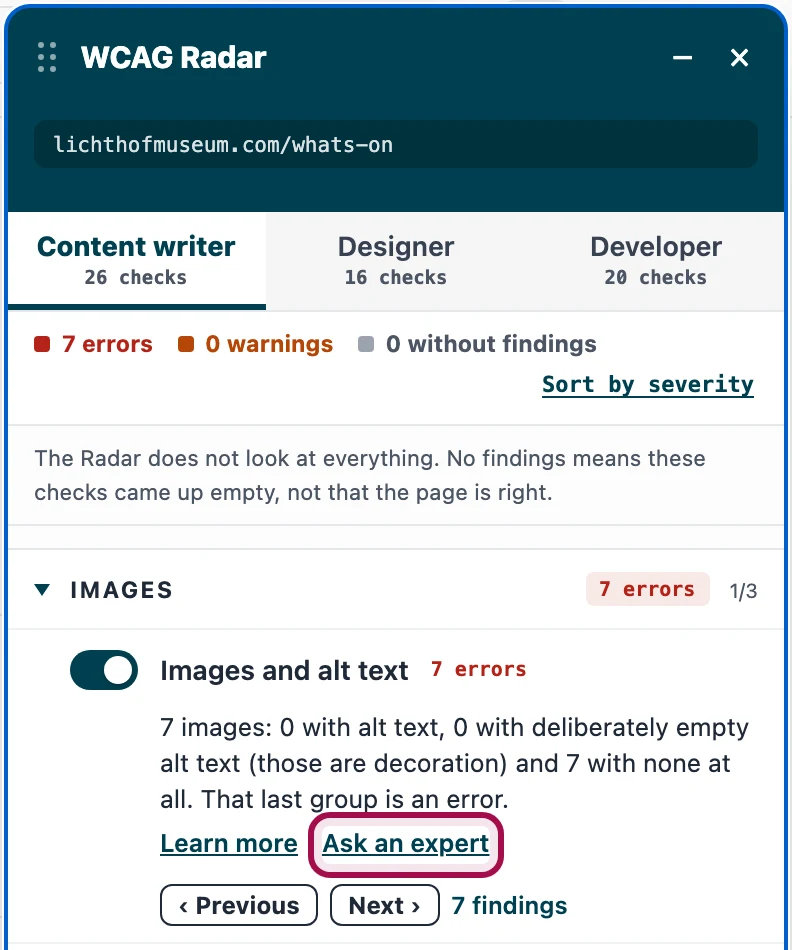
Click Ask an expert in WCAG Radar
WCAG Radar is our checker for your browser. Switch on a check and the link sits underneath it. The tab, the theme, the check, the version and the page travel with it. Without the Radar you ask your question in the portal itself.
Write your question
That context is already filled in for you. You add what you are unsure about and what you already tried. A screenshot or a piece of code can come along.
We ask who is available and what they charge
We put your question to the specialists and come back to you with the name of the one who can pick it up and their rate. Then it is your call.
Say yes and the expert answers
In that same thread in the portal. Once the topic is done, the expert closes the thread.
Where things stand
This service is still in development and not for sale yet.
- You can ask your question already. We tell you whether a specialist is available and what it costs. You decide after that. Say no and it costs you nothing.
- Nothing is deducted and there is nothing to buy.
- We work with independent specialists in the Netherlands, each running their own agency and with more than five years of experience auditing websites against WCAG.
- You need no WCAG Radar licence and no audit with us.
Frequently asked questions
Who are these specialists?
Specialists in the Netherlands who have all been doing this full time for more than five years. They are not employed by us: each of them runs their own agency, and we asked them for this project. In the portal you see who wrote each answer.
Do I need a WCAG Radar licence to ask a question?
No. In WCAG Radar the link to an expert sits under every check you have switched on, licence or not.
Does the page I am testing reach you?
Not on its own. The Radar runs in your own browser and sends nothing. If you use the link to an expert, the domain and path of that page travel along with the check you were on. Everything after the question mark is cut off, and an address on localhost or a file on your own disk does not travel at all.
Who on our team can ask questions?
Anyone with an email address on your domain can ask a question, and each question shows who asked it.
What if my question is too big for one go?
We say so before we start, and it costs you nothing. If you ask something that is really a research project, such as whether your whole webshop is accessible, we suggest what would fit: a mini audit, or a few separate questions about the parts that matter most.
Ask your question in the portal
Threads and attachments all live in the Proper Access audit portal.
Go to the portal (opens in a new tab)You sign in with your own email address.
Rather have the whole site checked?
One question solves one thing. To find out where your site stands as a whole, an audit is the way: an auditor goes through it with a screen reader and a keyboard, and you get the findings grouped per element instead of per success criterion.
From here Proper Access takes over
Answer a few short questions and we will tell you whether you fall under the BDTO or the EAA, then email a quote within two working days.
Last updated: